Over the weekend I made some changes to my network in preparation for venturing out as an Anonymous user. My real reason for doing this is to see if I can somehow escape Google's tracking. This is an interesting twist since I am using Blogger to blog on and that in turn is owned by Google.
I have been reading up on the DarkNet and what that really means. Since I am getting more involved with security I thought it might be a good thing to explore various anonymization networks, e.g. TOR, to see how they function and what to expect when I am out there. This obviously involves assuming a pseudo id to mask who I really am - new territory, haven't ventured there before.
I was able to set up a VLAN on the ActionTec router from http://support.actiontec.com/doc_files/Creating_an_Ethernet_VLAN.pdf on the ActionTec site. The instructions are a little old but after a bit of trying out different things, I was able to have a VLAN (tagged) on a specific port with a DHCP server and a localized subnet. I then proceeded to change the wiring around a little, moving my MacMini ethernet connections from the tail-end switch to the one just before it. I set up the first switch to have a tagged input port then connected an Ethernet cable from the ActionTec to it. Next I set up the switch to send the new VLAN down a trunk line to the second switch and from there to the third and last switch. In the process of doing this I consolidated a number of Ethernet connections to one switch which actually speeded up my access to the outside. I was also able to reduce the usage of the last switch in the stream to make it more experimenter like, including adding the new VLAN.
I now have a line from the ActionTec router that has only one port (I will be putting a laptop on this port) isolated from my network that I will be able to use for Anonymity.

This is a blog mostly about techie things, what I am doing to my apartment network on the cheap, IOT, 3D Printing, Raspberry Pis, Arduinos, ESP32, ESP8266, Home Automation, Personal Weather Stations, Things That Go Bump in the Night, and some side issues that need discussing. Remember, sometimes the journey to an end is as much fun as the goal achieved!
Showing posts with label TOR. Show all posts
Showing posts with label TOR. Show all posts
Monday, February 10, 2014
Monday, July 15, 2013
Implementing a 1-Port Router
Now that I have a somewhat better handle on the Tor Proxy, I am back to thinking about a 1-Port Router. One of my next experiments will be to plug the RPi Tor Proxy into a tagged vlan port. I am hoping that I can use Shorewall and some vlan libraries to make a one port router. It would appear that this will be safe since there is no physical access to the cable that goes from the managed switch to the RPi ethernet port. My idea is to use Shorewall as the main routing mechanism to isolate separate vlans from each other (except in certain cases), but still provide dhcp services to a couple of the vlans. So now I am thinking the following:
- The RPi will be connected to a managed switch with a single ethernet connection. The ethernet connection will be limited to tagged packets on several vlans only. The vlans that will be considered involve a vlan for Media, for Experimentation, for Personal services, and for Extra-network connection (i.e., to the ActionTec router). Non-tagged traffic on the switch port will not be allowed.
- The RPi will provide dhcp services to the Media vlan.
- The Tor Proxy will provide a firewall to the Extra-network connection; all Tor related traffic will be on this vlan. Access to the Tor Proxy lan will be via a WPA2 wireless (per the Onion Pi setup).
- The Tor Proxy lan should be isolated from the RPi itself.
- The Personal services vlan will be allowed to connect to the Tor Proxy and then to the Extra-network vlan. The general Tor Proxy lan will not be allowed to access the Personal services vlan.
- After analysis of the connection to the managed switch, I have come to the conclusion that the only possible problem with the hardware setup is that the wireless connection (for the Tor Proxy) might be able to be compromised. Perhaps I should think of implementing a RADIUS server of some sort. I could host it on the RPi but that might be a security issue.
- I would also like to add a separate wireless access port setup with a separate wireless dongle and ethernet-usb connector. I would make that one subscribe to one specific vlan.
- Implement an LCD panel control for all of this?

Wednesday, June 19, 2013
I Now Have a Movable TOR Proxy as Part of the Network
I was able to complete the TOR proxy that I wanted to put together. I first followed the instructions at http://learn.adafruit.com/setting-up-a-raspberry-pi-as-a-wifi-access-point/ to get one of the RPis to work as an access point. I then started following the instructions at http://learn.adafruit.com/onion-pi to get the TOR proxy working. I reset my managed switch to have a port open to the outside (my
psuedo-DMZ), plugged in the RPi, and restarted it. I was able to check
it out using http://www.ipchicken.com and found that my ip was coming from the output of a TOR relay. Success ...
I have also opened an identical port to the outside in the third switch that I have in the house. In that way, I am able to move the TOR proxy from one part of the house to the other.
I have also opened an identical port to the outside in the third switch that I have in the house. In that way, I am able to move the TOR proxy from one part of the house to the other.
Monday, June 17, 2013
Thinking of some Proxy add-ons
The TOR proxy seems like a good idea for using a spare RPi. I wouldn't do it if its your only RPi though. Too much of a chance that you will just keep using it over and over. I was thinking of adding a second wireless adapter and making it a wireless-to-wireless proxy instead of a wireless-to-ethernet proxy. In fact I was also thinking of adding a second ethernet to allow a connection via a ethernet switch to the LAN side of the proxy. Then what I would have would be a wireless access port, with the capability of connecting either through a wireless adapter or ethernet on the WAN side and wireless and/or ethernet on the LAN side. I would also want to be able to use shorewall to manipulate the capabilities a little better. Although the Adafruit instructions create a nat firewall that is adequate, I would still like to have a finer resolution on what I will allow. I wonder if this would be a good fit for the 2x16 LCD screen with buttons from Adafruit that I have to be able to set up the correct connections from. Maybe something like this:

In addition, I could use CURL to access the internet through my companies Guest account. There is a Cisco Web Authentication component, hence the need for CURL to authenticate prior to connection. The connection would be something like:
OP=`curl -k -d "buttonClicked=4" -d "err_flag=0" -d "info_flag=0" -d "username=guestname" -d "password=guestpassword" https://wirelesssubdomain.mycompany.com/login.html`;
That would be a very useful item at work and at home. Hmmmm. I have to think some more about this.

In addition, I could use CURL to access the internet through my companies Guest account. There is a Cisco Web Authentication component, hence the need for CURL to authenticate prior to connection. The connection would be something like:
OP=`curl -k -d "buttonClicked=4" -d "err_flag=0" -d "info_flag=0" -d "username=guestname" -d "password=guestpassword" https://wirelesssubdomain.mycompany.com/login.html`;
That would be a very useful item at work and at home. Hmmmm. I have to think some more about this.
The TOR Proxy is Now Running
Well after some false starts and puzzlements, I was able to complete the TOR proxy that I wanted to put together. I first followed the instructions at http://learn.adafruit.com/setting-up-a-raspberry-pi-as-a-wifi-access-point/ to get one of the RPis to work as an access point. The problem that I was having was getting the hostapd to recognize the wireless adapter that I was using. I tried three different wireless adapters (having gone to Staples to get the third) and could not get them to work. When I tried looking through the logs with dmesg, I could see that the adapter was recognized and a driver was immediately launched, but hostapd was not able to work with it even though I put the name of the driver that was launched in the configuration file. Then it dawned on me that having the driver name in the hostapd.conf file might mean that it was trying to install the driver. So I removed it. When I did, hostapd started working correctly. All I can figure out is that I had updated the system and possibly the new version of the system automatically loaded a driver each time it got an adapter that it recognized.
I finished up the install and was able to get the RPi to work as a wi-fi access point, with a simple firewall and nat setup and the other connection through the ethernet port. I then started following the instructions at http://learn.adafruit.com/onion-pi to get the TOR proxy working. The instructions do not have you rebooting the RPi at particular intervals, and that turned out to be the problem child. As soon as I rebooted to a known state, my setup started working as advertised. I reset my managed switch to have a port open to the outside (my psuedo-DMZ), plugged in the RPi, and restarted it. I was able to check it out using http://www.ipchicken.com and found that my ip was coming from the output of a TOR relay. Success ... here is a picture of the finished product for what it is worth.
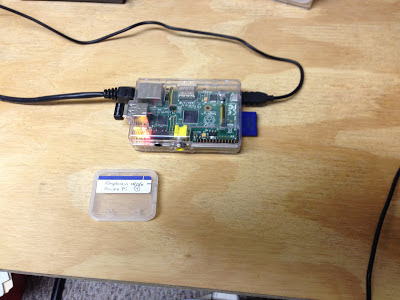
I finished up the install and was able to get the RPi to work as a wi-fi access point, with a simple firewall and nat setup and the other connection through the ethernet port. I then started following the instructions at http://learn.adafruit.com/onion-pi to get the TOR proxy working. The instructions do not have you rebooting the RPi at particular intervals, and that turned out to be the problem child. As soon as I rebooted to a known state, my setup started working as advertised. I reset my managed switch to have a port open to the outside (my psuedo-DMZ), plugged in the RPi, and restarted it. I was able to check it out using http://www.ipchicken.com and found that my ip was coming from the output of a TOR relay. Success ... here is a picture of the finished product for what it is worth.

Saturday, June 15, 2013
Trying to make a TOR Proxy
It looks like Adafruit came out with a tutorial on "Onion Pi". This is a TOR proxy for the Raspberry Pi. TOR is an anonymizing network. A lot of people have been showing interest in TOR since the issue with the NSA looking into people's information like email and phone calls came to light. I am just interested in the proxy because of the security aspects of it, since I am in the security game now. So later tonight I will go through the instructions.
-- LW
-- LW
Sunday, May 26, 2013
Project #7 - Add a TOR Gateway to the Network
As part of experimentation throughout the network, I would like to add a TOR gateway on a Raspberry Pi to push information over the TOR network.
Subscribe to:
Posts (Atom)