Labels

Sunday, January 25, 2026

Looking at alternatives for the IP Power Strip project

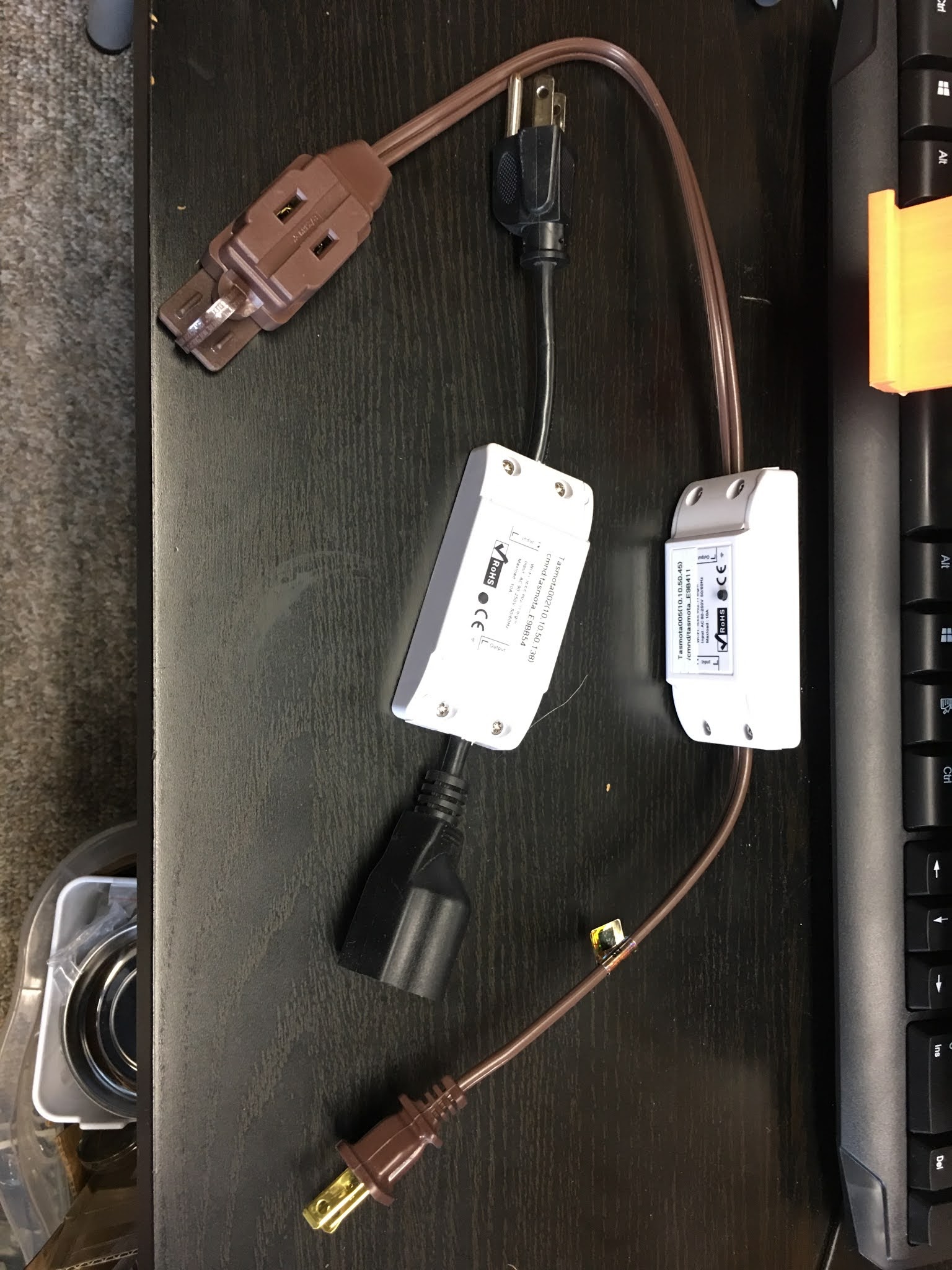
 I have recently discovered the whole Tasmota thing.  It occurred because I finally started setting up some Sonoff switches and Shelly pucks for use with my HA-IOT server.  When I finally pushed the first Tasmota load to a Sonoff switch and set it up as an extension cord.  When I went to Node Red and started controlling the switch, a lot of lights went on in my head.  

Up to this point I have been concentrating on the IP Power Strip as something being controlled by a Raspberry Pi.  Now, I don't need that.  I did however discover that China is going out of their way to prevent the Tasmota from being installed on their products, so OTA changes cannot occur.  They are interested in these products coming under their ecosystem and no other.  I discovered that with a Geeni smart power strip which I was unable to update from an OTA Tasmota push.  I have not at this point, looked into a physical connection with my development system.  I am pretty sure that the initial load onto this device will have had to be done by a physical connection.  I might have to unsolder something to do it.

This change has opened a whole different aspect to getting lights on and off.  I am anxious to get the Shelly pucks to work in my light switches.  As long as I have enough IP address space I should be good.


UPDATE: rejuvinated

IP Power Strip #06 - Strikedown in a Docker Container

 It occurs to me that the optimal way to implement the strikedown function is to have it in a Docker container.  I was able to locate a Python project from GitHub that does describe a method for launching such a shutdown sequence in a process and alludes to a Docker Container implementation:

- https://pypi.org/project/systemctl-mqtt/

- https://github.com/fphammerle/systemctl-mqtt

- https://github.com/fphammerle/systemctl-mqtt/blob/master/docker-compose.yml

The docker-compose file is especially relevant since it implies a docker container can be built from scratch.  I also note that this implementation requires access to python3-dbus, python3-gi, and python3-paho-mqtt which I believe are all lower level routines.  I will have to implement this container to determine if it meets my needs.

UPDATE: rejuvinated

IP Power Strip #05 - Some Operational Considerations for the IP Power Strip Project

 I have discovered that most of what you want to do with a scene in IOT is actually a binary sequence, it either is or isn't performing it's function.  Lights on / off, doors locked / unlocked, security alarmed / not-alarmed, etc.  You have some secondary effects like dimming values or changing a lights color but that is after you turn the light on, likewise with setting the temperature on a furnace.  So in essence it is a two message sequence.  Likewise, if you are shutting down a plug and a computer is connected to it, you would want to send a message to start the shutdown, followed by a timer of so many seconds before you issue the turn off plug message.  

As I have been using Node Red, I realize that it doesn't necessarily scale well, and you are re-deploying the Node Red thread multiple times as you are making changes on different tabs (unless you purposefully select just the new flows before deploy). And if you need to run tests on a separate vlan as you are doing development it breaks the stuff that you already have working. Also, by partitioning the problem up into smaller bits, your Node Red applications can continue to run while you are developing something else. By having the applications in smaller chunks it supports the CI/CD development pipeline.

What do you do if you want to add additional plugs to power your HomeLab network? I need to bring stuff up and down all the time. How do you do this in such a way that it is a minor bump if you add additional power strip plugs to control and additional ways to control them with? What if you need to drop in a dimming controller to be controlled by a new set of Node Red controls without disrupting Node Red flows that already do something that works? What do I do if I need the host that my Node Red flows are running on for something else? Can I simply move it to a different host? What if the host is not an ARM but it's an i386 based processor?

This experiment has everything to do with getting very familiar with Node Red as a prototyping tool. But I also wanted to be able to take down portions of my network (servers, switches, etc.) when I would shift attention to some of my other hobbies like woodworking/woodcarving. I wanted to be able to take on multiple types of smart plugs, some based on RPi hats, some based on wifi power strips, some based on z-wave devices. I wanted to be able to add onto, or subtract from what I was doing without having to continuously update one server worth of Node Red. Doing it in Docker containers has allowed me to move things around easily. I can see this generic control set (Master and multiple Slaves controlling multiple Interfaces to the hardware) being used for all kinds of things IOT wise. I also wanted to have control over what is powered up (including lights) from both home-assistant, NanoMotes and WallMotes and garage controllers without changing either a scene def in home-assistant or changing up my single Node Red instance.

That being said, let me use my experience in other systems to explain why this setup might need multiple instances of Node Red and why that makes sense. Think of those automations that are temporary, with two examples: a test and a temporary power setup.

Say I have an already running automation with Node Red in a Docker container. It is using an MQTT broker as the go between for all the “production” automations. In this case I would like to add some functionality to my “production” automation. If I have my MQTT broker running in a container, I can just spin up another instance on a different host (note different IP). I pull my definition for the automation from a Configuration Management server, like Git, modify the MQTT IP to point to my test MQTT broker and spin up the container (this could be automated with a script). If I require other containers for development I can also pull those, change the MQTT IP, and spin them up before making changes (this could also be part of the same script), I might even need some test driver NR containers as well. I can now make changes as necessary for the new function and test it until I am satisfied it is what I want. I push the definition back to Git. The containers I needed for development and test can now be taken down. I can now deploy the change, that involves taking down the “production” automation container, pulling the updated automation container, setting the MQTT IP for production, and spinning up the new container which now should take the place of the old one. By doing it this way, I have minimized the down time for the “production” automation.

In the case of the temporary power setup, in my experiment, I might need a new automation for part of a Halloween or Christmas display where it changes from year to year as to what lights are lit; or alternatively I might have to set up the lights for a party which I just found out about the night before. In my power experiment I have at the bottom layer, an InterfaceProxy that controls individual power strips, switches, lights or what have you. Each plug is given a name representative of what it is powering (and can be changed on the fly). Each plug also has a semaphore count that dictates whether the plug is turned off or not. The next level up is a Slave Function, which controls a grouping of plugs. Each plug might have more than one grouping assigned to it. The Slave takes care of one grouping of plugs which might go across multiple devices. The Slave knows it’s list of plugs when it is given a list of names. The Slave issues the turn off, turn on when it is commanded. A Master Function controls the whole thing at the top. You only spin up a Slave container when you have a new list of plugs to control. You only spin up an InterfaceProxy container when you have a new set of hardware “plugs” to control.

So for my Christmas lights example, you would bring out the smart power strips (probably Tasmota), spin up one or more InterfaceProxy containers, set the plug names, spin up one or more Slave containers, give the list of plugs to control for each from the Master container after the Slave announces itself, and you can then control your Christmas lights through the Master container. After Christmas the new containers are spun down, smart power strips and lights are put back in storage until next year. For the party example, just feed a list of the plug names that need to be controlled, and the Master container spins up a Slave container and the cycle repeats. The new Slave container goes down after the party.

So development of the MQTT messages that control all this will be paramount.

UPDATE: rejuvinated

IP Power Strip #04 - the Strikedown Container

I had suspected that the fastest way to build this was to use node red, at least I know that shutdown and reboot are easily implemented.  The issue is Mac and Ubuntu computers.  I don't think that  I will need to consider PCs (except for the Atom HA-IOT Server which runs Ubuntu).  I got the initial sequence done in node red, however I have not set it up yet to do an actual shutdown/restart - still figuring out the MQTT messages to use.  I decided on the following messages

  • relay/strikedown along with relay/strikedown_answer
    • reboot: 0/1, name: IP1, ping: 0/1
    • if reboot is 0 then does a shutdown
    • if reboot is 1 then does a restart
    • if ping is 1 then starts ping message sequence (5 times with 2 sec in between)
    • note when ping is 1, upon restart the ping sequence will start up
  • relay/myping
    • name: IP1, ping: 0/1
    • if ping is 1 then starts ping message sequence (5 times with 2 sec in between)
    • if ping is 0 then stops ping
    • note when ping is 1, upon restart the ping sequence will start up
  • relay/ping
    • name: IP1

strikedown, the Docker container in node red, will always use port 1885 on each host.  That way, I will be able to get to the node red invocation to make changes.  For strikedown on Raspberry Pi, theer is a node red contrib library that does both functions.  For the one on Ubuntu servers it will have to be made specific to the server.  I am thinking of using Python since there is a Python function node in the contrib library.

The strikedown node red sequence is in two parts, the startup and the strikedown sequence.  The startup sequence is:


The strikedown node red sequence is:


Update: I have since discovered that the Shutdown and Restart Nodes in this sequence do not work under a Docker Container running on RPi.  So I will have to figure out how to accomplish the task in another way.
UPDATE: rejuvinated

IP Power Strip #03 - the Python development environment setup for the IP Power Strip

I have been reviewing some blog material concerning Python docker development, here, here, and here.  In addition I have been reviewing some Python libraries developed to interface with MQTT.  I intend to use docker-compose to separate out the different elements so that I can individually change the code.  I also need to think closely about how I will be developing containers that might run on different platforms other than the Raspberry Pi, for instance on the Ubuntu server which is of a different architecture.  The environment should look like this:

  • IP_Power_Strip_Project
    • docker-compose.yaml
    • Master
      • Dockerfile
      • requirements.txt
      • Src
        • globals.py
        • Master.py
    • Slave
      • Dockerfile
      • requirements.txt
      • Src
        • globals.py
        • Slave.py
    • InterfaceProxy
      • Dockerfile
      • requirements.txt
      • Src
        • globals.py
        • InterfaceProxy.py
    • Shutdown
      • Dockerfile
      • requirements.txt
      • Src
        • globals.py
        • Shutdown.py

For right now that covers it.  I will update this post as I come into other aspects of the development.

UPDATE: rejuvinated

IP Power Strip #02 - How the IP Power Strip will work in the network

I am looking to make the IP Power Strip as useful in my network as is possible.  I should be able to use the IP Power Strip outside of the normal turn on/off my HomeLab and extend it to things like control lights during Christmas and Halloween.  What I am doing is turning power on and off.  Throughout the year it makes sense that I would use the units in the HomeLab, but these units would also have a use elsewhere.  I am rather interested in integrating it with my HA-IOT network and use the MQTT server that already resides there.

For the Master container, I visualize the following:

  • it should be able to be "programmed" with control sequences to a certain point through MQTT messages
  • I should be able to issue different sets of controller sequences "programs" so that the IP Power Strip can be controlled independently depending on the context
  • I should be able to issue a list of IP Power Strip containers (IP addresses) to the Master container so that it knows the locations
  • I should be able to effect a controlled sequence when tasked by an MQTT message
  • I should be able to simply indicate a vacation mode and have the Master container do the rest
  • I should be able to poll the Master container to reveal the current status of the IP Power Strips and what they are controlling
  • The Master container should be able to respond to heartbeat messages in context

For the Slave container, I visualize the following:

  • I should be able to have the Slave container come up issuing heartbeat messages to the Master container to indicate the status
  • The slave container should be able to be controlled via MQTT messages for a single change or multiple changes
  • The slave container should be able to be controlled via MQTT messages to stop/start issuing heartbeat messages

For the InterfaceProxy container, I visualize the following:

  • This container is how we interface to the actual equipment, it is a proxy by reason that there may be other already built IP Power Strips, or power like systems that we want to integrate into the IP Power Strip system
  • The InterfaceProxy container should be controlled by a RESTful interface, with json coding
  • The only container that would interface would be the Slave container, on the other side is hardware
  • The InterfaceProxy should receive unique IDs and be able to respond to a request for number of "ports" as well as initial setup and current setup for the "ports".  Initial setup defines how the "ports" come up from a hot start
  • Notice that the InterfaceProxy can also serve as a test container which can be metered and check for correct sequences at the low end

For the Shutdown container, I visualize the following:

  • I should be able to have the Shutdown container come up issuing heartbeat messages to the Master container to indicate the status
  • The Shutdown container should be able to be controlled via MQTT messages to start a shutdown on the computer where it resides
  • The Shutdown container should be able to be controlled via MQTT messages to stop/start issuing heartbeat messages

UPDATE: rejuvinated

IP Power Strip #01 - Some initial considerations

 I started thinking about an IP Power Strip almost 3 years ago in December 2017.  Since that time I have been inundated with work issues and never really came back to this project since I was always tired from work.  Now that I have been having more time at home due to the pandemic, and the fact that I had a power outage in my house that damaged a lot of equipment, I have returned to this project.  I have a definite need to turn a lot of my HomeLab equipment off when I am involved with other things.  I hope to travel and my interests have gone to other things like woodworking and wood carving.  I don't wish to give up the HomeLab completely, but at the same time I would not like to pay the whole bill if it just sits there idle.

First, I rearranged my network for power conservation and opened up a new project for an IP Power Strip.  I am hoping to be able to control the power strip from an MQTT based service.  I figure that if I setup Raspberry Pis with some relay hardware on a hat, then have the controller software running on the RPi interfacing to an MQTT server, I should be able to make this work.

I put in an order for three Keyestudio 5V DCAC 4-Channel Relay Shield Module Expansion Board for Raspberry Pi from Amazon.  I figure the easiest way to develop an IP Power Strip is to use a Raspberry Pi for the "brains" and a shield/hat that has relays on it.  Note that this one has a 10Amp limit on current through the relays.  But, and here is the good thing, individual items that will be controlled don't have anything near the 10A limit.

If I develop the software using a python controller, embedded in a docker container, then updates will become easier and my development environment can move around at will.  There will be two actual containers that do the work: (a) a master controller that does the real thinking concerning sequencing of on-off commands, looking for heartbeats from the slaves, etc. and (b) a slave controller that does the heavy lifting in that it actually turns the relays on and off as well as issues heartbeats, etc.  This should allow me to put as many IP Power Strips around the house that is necessary.  Also, I can issue commands via the home-assistant console.

I was also thinking of a third container that might be useful.  A container, that interfaces to MQTT, that issues heartbeats, and can issue a shutdown command on equipment.  The master controller would then have the ability to issue an mqtt shutdown command, listen for heartbeats, then when the heartbeat ceases, could issue a command to the IP Power Strip to turn off the power to that computer and report back status on the computer.  This has the added thought that it would be universal, working on different operating systems.  The code is pretty much the same, but the implementation is different.

UPDATE: rejuvinated

Project #21 - Develop an IP controlled power strip for managing power consumption in the network

I have thought of doing this mainly for Christmas time, but now that I have aspirations of being able to control the power consumption in my network.  To do this, having an IP controlled power strip, either controlled from WiFi or from Ethernet (Ethernet preferred), I will be able to turn off equipment at will.  Since I need to have some waiting periods, it should have an intelligent aspect to it to be able to wait until certain events have happened before the power is switched off.  In addition, the reverse is true as well, so I see multiple components working in conjunction with each other to provide an overall solution.

UPDATE: rejuvinated

First steps towards an IP Power Strip

 Well, I just put in an order for Keyestudio 5V DCAC 4-Channel Relay Shield Module Expansion Board for Raspberry Pi from Amazon.  I figure the easiest way to develop an IP Power Strip is to use a Raspberry Pi for the "brains" and a shield/hat that has relays on it.  Note that this one has a 10Amp limit on current through the relays.  But, and here is the good thing, individual items that will be controlled don't have anything near the 10A limit.  When they come in I will post updates as the project develops.  I will post most of the updates and development on my other blog, RPi Experimenter.

I will need to setup a Docker container repository if I use Docker in a DevOps manner.  Might be nice to get into that.  I need to be able to use the IP Power Strip anywhere in the network, hence I will have a need for both WiFi and Ethernet (making it useful outside during Halloween/Christmas).  It should be controllable from my Admin vlan even if it is plugged into a different vlan.  The control must be smart, things have to be done in sequence and be able to be controlled by humans.  Part of the problem is that I need some way of shutting down computer equipment and being able to bring it back up when power is supplied.  Also, I need to know if the commands were received and processed and what was the result.

I should be able to use MQTT messages for status/commands.  That would allow commands from the HA Server and from the home-assistant controllers.  I need to think carefully about protecting the command flow, especially if it is going across WiFi - so encryption outside of WPA2?

So a Master control container, a Slave container (that controls the switching and responses), and a container that controls shutdown (and issues what is happening).  So Docker it is then.