Labels

Showing posts with label Rack. Show all posts

Tuesday, November 28, 2023

I have now moved the Experiment Pod to my HomeLab rack

 I decided to drop my participation in the community sub-committee and focus on other things.  In so doing, I have moved the Experiment Pod to the HomeLab rack.  I decided to change out the rack and put the entire Experiment Pod panel into the rack as well as an Edgerouter-X to give the ExPod vlan a dhcp source and isolate it from the rest of the network.  The unmanaged 8 port switch is there as well to connect to each of the ExPod RPis.

In addition, I have added a managed switch (GS108Tv3) to offload the number of connections to the key managed switch outside of the HomeLab rack.

Thursday, September 8, 2022

There appears to be an issue with the WiFi in my apartment

I have discovered that the WiFi is now stopping on a regular basis in my apartment.  I have no control over it but I would like to set things up so that I don’t have as many issues in what is available.  I have moved the Tempest Weather Station to the Portal SSID so that it has the most connectivity that it can get without being connected to the equipment in my rack.  I am also going to take down the UniFi AP AC Pro so that it doesn’t add to the interference in the apartment.  Perhaps removing this source will help with the overall speed of the WiFi in my apartment.  The problem with this is that I am using the UniFi to connect to the Tasmota switches.  I need something to do this with.  It occurred to me that I might use one of the RPi Zero Ws that I have to make up an isolated network within the rack.  If I keep the power level low enough, I should not cause interference outside of the rack.  Note, I do not have control over what the WiFi does or does not do.

I am also setting up an active/passive WiFi checker within the apartment so that I can get some data with which to analyze what might the problem be.

Update:  I have found 25 APs for the complex included in 832 devices just in 45 minutes.  There is ample amount of WiFi packets that could potentially cause issues, especially if they are on the cusp of the signal.  Further research is warranted.

Friday, February 11, 2022

HomeLabUpdate #01 - Initial Rack Setup

 As I came into the Apartment, I had setup the rack to have (from top to bottom):

  • 24 port patch panel
  • Ubiquiti Edgerouter-12 Router
  • Short shelf for KVM and regular switch/ER-X
  • Netgear M4100-26g Switch
  • Panel with 4 Raspberry Pi 4s (RPiInject, RPiCICD, RPiLDAP, RPiPlex)
  • Panel with 4 Raspberry Pi 3Bs (RPiSecure, RPiPower3, RPiPower2, RPiPower1)
  • Shelf for containing WDMyCloud drives
  • Open area (2U) TBD on contents
  • Proxmox Server (2U case)
  • APC UPS (1U)

I had left 6 Ethernet cables connected, numbered #8-1 through #8-6.  When I got to the apartment, I added the GL-iNet SLATE router (in Repeater mode, without second SSID) as the input to the apartment's wifi system.  My printer is connected to the wifi system and I have connected the HA-IOT server to the back of my Acer Monitor with connections through the 4-way KVM switch.

Thursday, December 23, 2021

Future Rack Setup

Background: I have a distributed HomeLab that I have built up over the years that I had become quite proud of.  It allowed me to move equipment about the house and make changes as I needed as well as include new equipment that I purchase.  This included at least 8 different vlans for different purposes, including separating media and IOT equipment.  Equipment consisted of an Edgerouter-12, M4100-26g switch, five GS108Tv2/v3 managed switches throughout the house, Proxmox server (FX8320 w/16GB), Home assistant server (Zotec Atom D525), Mac Mini server, several Cameras, a couple of Edgerouter-Xs, and several Raspberry Pi’s performing different functions including interfacing a personal weather station.  My main hobbies include working with the RPis and Arduino and doing various networking experiments (I’m an engineer by profession).
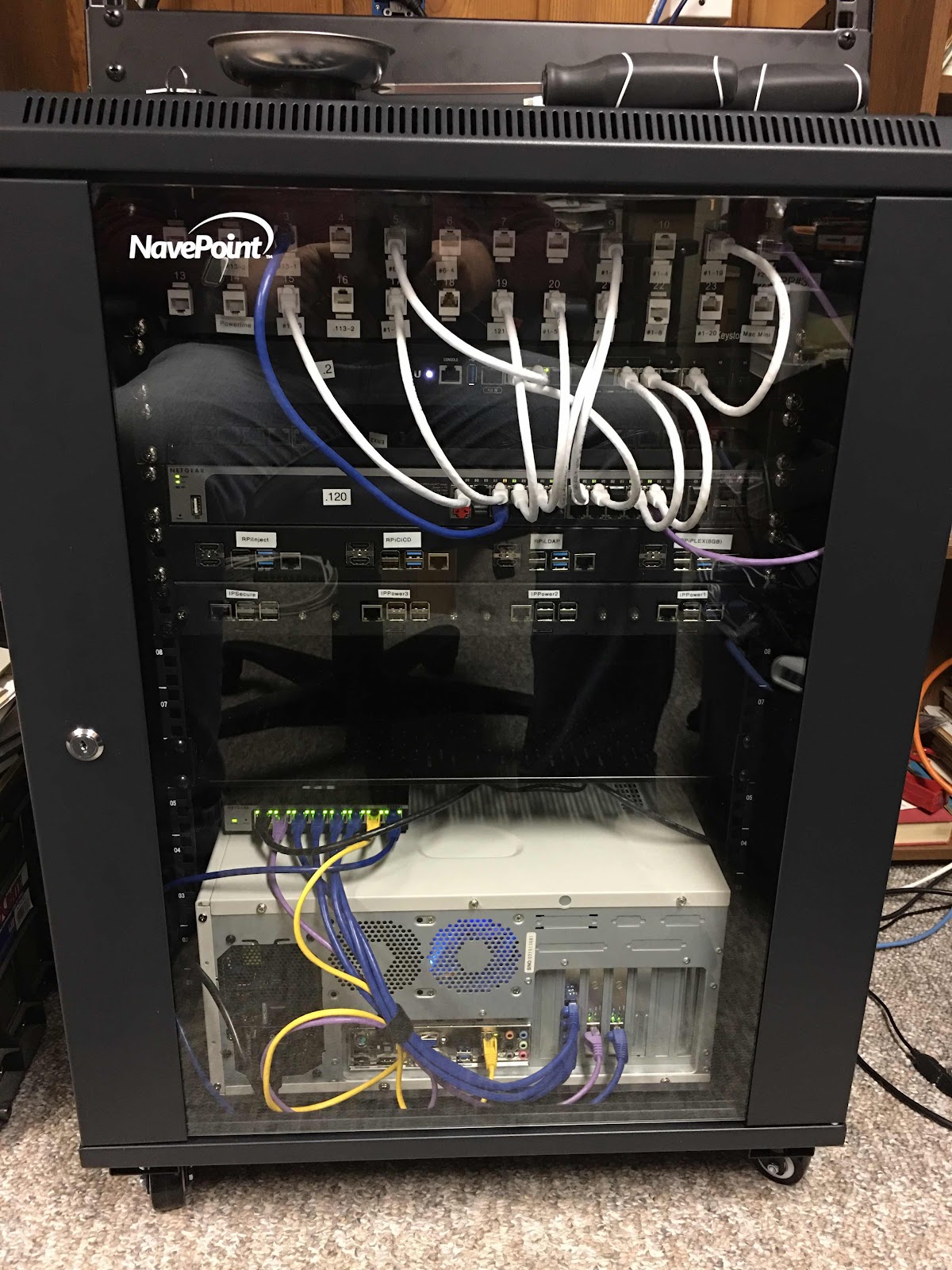


That is all changing now that I am downsizing into an apartment in a month.  I’m moving into an environment that has wi-fi only (no Ethernet in the walls, so wi-if bridge for the rack), and no way to change out switches or door locks for automation.  I am limiting myself to the one 15U rack and some plastic tubs for extra electronics to play with.  So, currently the rack contains: an Edgerouter-12, an M4100-26g switch, one GS108Tv2 switch, the Proxmox server, two WD MyCloud NAS, and eight Raspberry Pi’s.  The Proxmox server is in a regular desktop case laying on its side (soon to be put in a 2U case).


Other than rack mounting the Mac Mini, what other things can I set up for both now and in the future?